

Free tool
Free SEO audit tool for any page on your site
How healthy is your website, really?
Enter your page and the keyword you want to rank for. Results in about 30 seconds.
Enter a valid website address.
No email needed to run it.
Reading your page...
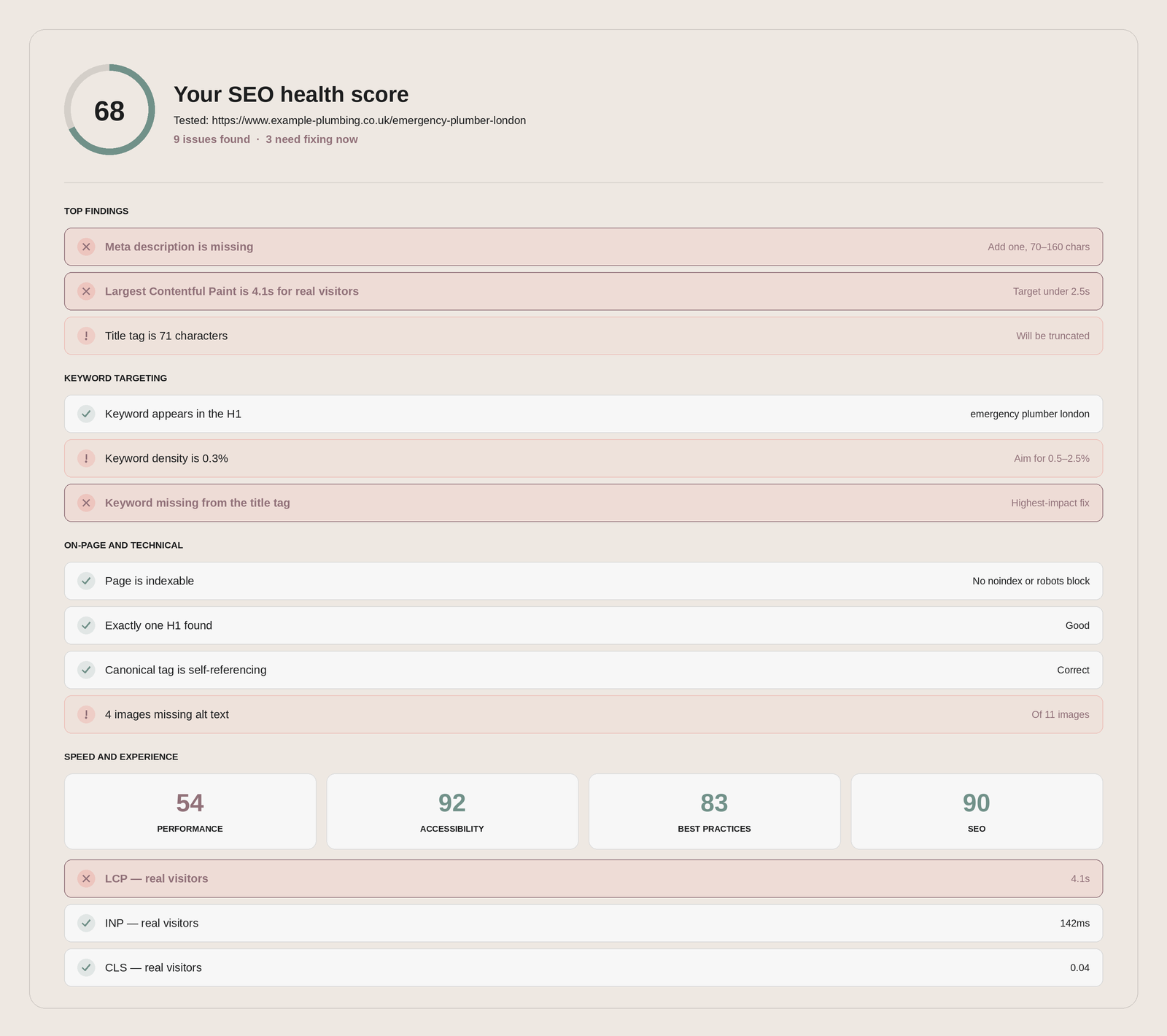
Your SEO health score
See the rest of your report
Your full results are ready: keyword targeting, every on-page check, speed scores and real-visitor data.
Tell us your name.
Enter a valid email.
One email with your top three fixes. No sequence, no follow-up, nothing else unless you ask.
Enter a valid email.
That is the surface. There will be more.
A free scan checks the page in front of it. A full SEO audit looks at your whole search position, and tells you which fixes are actually worth your money.
- Keyword and search opportunity mapping, with real volumes
- Competitor benchmarking: who outranks you, and why
- Backlink profile and authority signals
- Content performance, gaps and cannibalisation
- Conversion and user journey review
- A prioritised roadmap, not a 90-page PDF nobody reads
What this free SEO check looks at
Four areas, pulled from live Google data and our own on-page analysis. It takes about 30 seconds, and you don't need an account.
Your title tag, meta description, H1, canonical tag and whether the page can be indexed at all. These are the first things Google reads, and the most commonly broken.
Give us the keyword you want to rank for and we check whether it actually appears in your title, meta description, H1 and URL, and whether you're using it too little or too often.
A live Google Lighthouse test on a simulated mobile device, covering load speed, layout stability and technical best practice.
Where Google has enough traffic data for your site, we show what real Chrome users actually experienced over the last 28 days. Field data beats a lab score every time.
All of it comes from live sources: Google PageSpeed Insights, the Chrome UX Report, and a direct read of your page as it renders. Nothing is cached or estimated.
How to read your score
Every check is measured against a threshold. Here's what "good" actually looks like, so you can judge your own results rather than guessing.
One caveat worth knowing: lab scores (the Lighthouse test) simulate a mid-range phone on a throttled connection, so they often look worse than reality. Where we can show real-visitor data, trust that over the lab score.
What to fix first
A list of problems isn't a plan. Most of the gain sits in the first two steps, so work in this order rather than starting with whatever looks easiest.
-
1
Anything blocking indexing
If the page is set to noindex, blocked in robots.txt, or returning the wrong status code, nothing else on this list matters. Google can't rank what it can't read. Fix this before you touch anything else.
-
2
Your title tag and meta description
The fastest win available. They're the strongest on-page signal you control and the first thing a searcher reads, and they take about ten minutes to rewrite. Get the keyword in, stay inside the character limits, and write for the click.
-
3
Core Web Vitals, if real visitors are failing them
If your real-visitor data shows LCP over 2.5 seconds, that's costing you both rankings and conversions. Prioritise field data over the lab score: the lab test is deliberately pessimistic, real users are the truth.
-
4
Keyword targeting and content depth
Make the page unambiguously about one thing, and make sure that thing matches what people actually search for. If your keyword doesn't appear in the title, H1 or opening paragraph, Google is guessing what you're for.
Everything else is refinement. Do these four in order and you'll capture most of the gain available on the page.
Free SEO audit tool: questions
The things people usually want to know before they run it.
Is it actually free?
Yes. No card, no trial, no usage limit. Run it on as many pages as you like.
We built it because most SEO problems we're asked to fix are the same handful of on-page issues, and people shouldn't have to pay to find out they have them. If it turns out you need more than a page-level check, you know where we are.
Do I have to give my email?
Not to run it. Paste a URL, get a score and your headline findings straight away.
The full breakdown — every check, every threshold, and what to do about each one — is behind a name and email. That's the trade: you get the detail, we get the chance to be useful to you later. No spam, and you can unsubscribe in one click.
How accurate is it?
The data is real. Speed and Core Web Vitals come straight from Google PageSpeed Insights and the Chrome UX Report, and the on-page checks read your live page as it renders.
Two caveats worth knowing. The lab speed test simulates a mid-range phone on a throttled connection, so it usually looks worse than reality — where real-visitor data is available, trust that instead. And a score is a summary, not a diagnosis: it tells you what's off, not always why it matters for your business.
How is this different from a paid audit?
This tool checks one page against known best practice. A full audit looks at whether you're chasing the right keywords at all, who's beating you and why, how your pages compete with each other, what your backlink profile looks like, and whether the traffic you already get is converting.
Put simply: the free tool tells you what's wrong on a page. The paid audit tells you what to do about your search performance, in priority order.
Does it work on any website?
Any public page on any platform — WordPress, Squarespace, Shopify, Wix, custom builds. It reads the page the same way a search engine does.
It can't reach pages behind a login, staging sites that block crawlers, or anything hidden by a firewall. Real-visitor data only appears if Google has enough Chrome traffic for the site, so smaller sites will often see the lab score alone.
How often should I run it?
Whenever you publish or substantially rewrite a page, and any time you change your site template or add a new plugin, app or tracking script — those are the usual culprits behind a sudden speed drop.
Beyond that, a quarterly pass over your most important pages is plenty. Running it weekly on a page you haven't touched won't tell you anything new.
What a free check can't tell you
This tool checks the page in front of it, and it does that well. What it can't see are the things that usually decide whether you rank at all.
- Whether your keyword is worth targeting: real volume, intent and commercial value
- Who is outranking you, and the specific reasons they're ahead
- Your backlink profile, and whether anything is holding you back
- Whether your own pages are competing with each other
- Whether traffic is turning into enquiries, or just arriving
- Which of the fixes will actually move revenue, and in what order
Full audits start at £650 and come with a prioritised roadmap, not just a list of problems.